TL;DR — QUICK ANSWER
Clipy Flare gives designers a temporary cursor spotlight while recording the real build. Point at one element, say the current and target values, then send the Clipy link to the developer’s coding agent. The agent gets the transcript and visual evidence, proposes the UI change, and can return a second recording as proof.
A designer says, “this button feels cramped.” A developer opens the Figma file, hunts for the right frame, guesses which button the comment refers to, changes the padding, and sends back a screenshot. The designer replies, “better, but still not quite right.”
Nothing in that exchange is difficult. It is slow because the useful context is scattered across places that do not travel together: the built page in a browser, the target state in Figma, a comment attached to a canvas coordinate, a CSS token in the codebase, and a screenshot in Slack. Every handoff asks the next person to reconstruct the comparison.
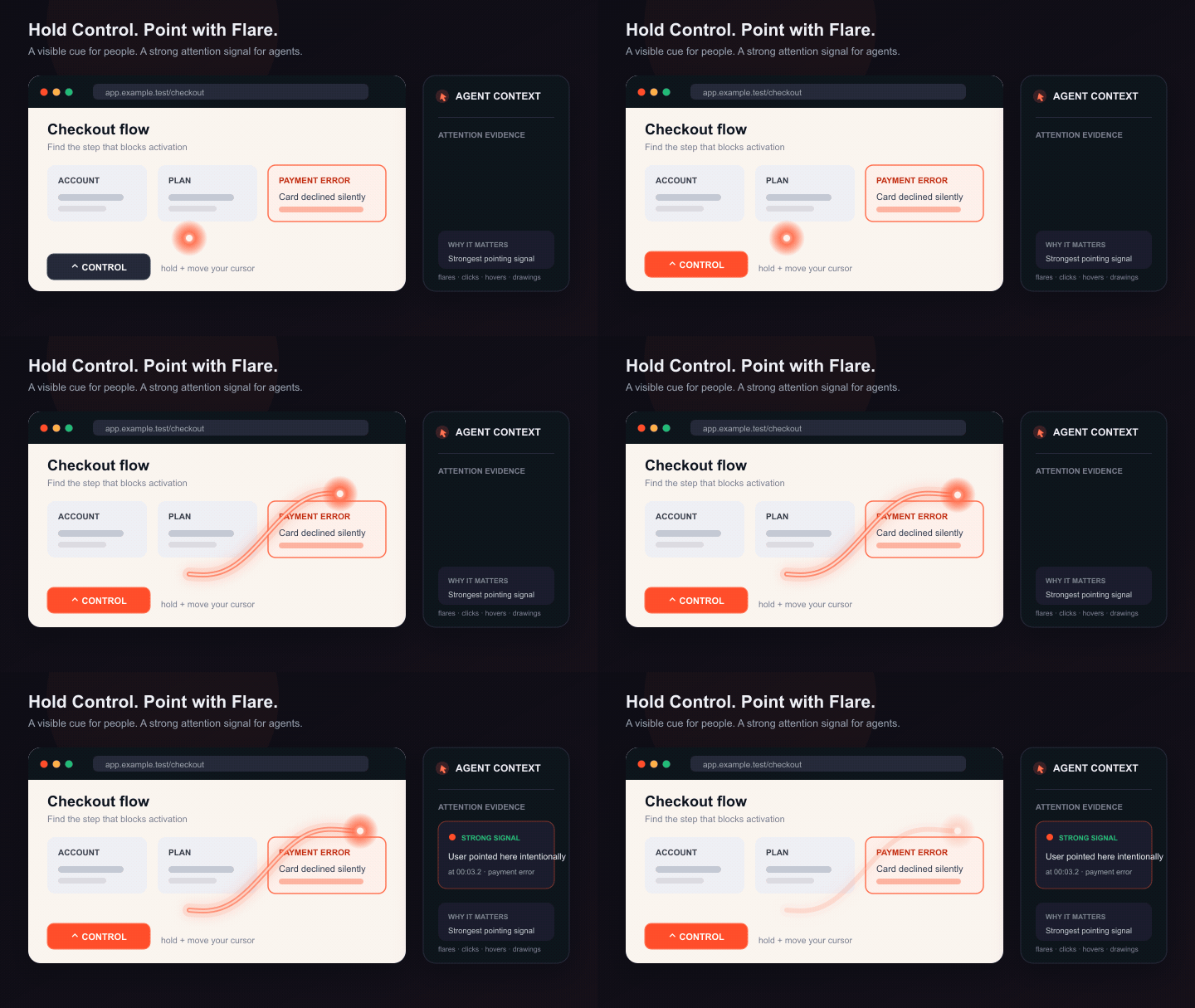
Clipy’s Flare feature changes the shape of that handoff. While recording the real interface in the native Mac app, hold Control and move the pointer. A warm fading trail makes the target obvious without permanently drawing over the screen. Narrate the measured difference while the pointer is there. When the recording is handed to a coding agent, the visual moment and the spoken delta arrive together.
This is not “AI designs the product.” It is a much more useful promise: the designer keeps making the visual decision, while the agent removes the translation work between a precise design observation and the code change that implements it.
Why does design feedback take more rounds than it should?
Design QA is a comparison problem. The built state has one value. The intended state has another. A useful note identifies the element and states the delta between them.
Most feedback tools preserve only part of that equation. A Figma comment preserves the target canvas but not necessarily the live implementation. A screenshot preserves the current pixels but not the hover state, transition, responsive behavior, or route that produced them. A screen recording preserves the sequence but, in a conventional recorder, the developer or agent still has to watch the entire file and infer which moment matters.
That is why design feedback collapses into adjectives:
- “Give this more room.”
- “The hierarchy feels flat.”
- “This blue is off.”
- “The transition is too heavy.”
- “Can we make the card feel more premium?”
These statements can be perfectly valid design judgments. They are poor implementation instructions. “More room” could mean padding, margin, line-height, max-width, or grid gap. “This blue” could refer to the label, border, icon, focus ring, or background. An agent cannot responsibly turn the note into code until it knows what the designer pointed at and what should change.
The fastest design iteration loop therefore has four properties:
- The real build is the review surface. You capture the thing that will actually ship, including interaction and responsive states.
- The target is visibly identified. The developer does not have to guess which element “this” means.
- The instruction is measurable. Current value, desired value, and token when known.
- The result comes back through the same surface. You review a working state, not a verbal claim that the change is done.
Clipy can carry that whole loop in two recordings: one that defines the deltas and one that proves the corrected states.
What does Clipy Flare actually do?
Flare is a temporary pointer highlight in the native Clipy Mac recorder. Start recording, then hold the Control key while moving the pointer. The recording shows a fading orange trail and a brighter head around the current pointer position. Release Control and the trail disappears. You can also double-tap Control to lock Flare on, or use the recording controls to toggle it.
That interaction matters because it is momentary. Traditional annotation tools often leave arrows, boxes, and brush strokes sitting over the UI while you continue the walkthrough. By the third note, the screen looks like a marked-up crime scene. Flare lets a designer draw attention for two seconds, finish the instruction, and move on with a clean screen.
It is also stronger than a generic “show clicks” ring. A click ring says an action occurred. Flare says, “this region is the subject of what I am saying right now.” That makes it useful for issues where no click is needed: alignment, optical balance, line-height, an awkward empty state, a shadow, a color mismatch, or the path of a motion transition.
Clipy preserves cursor movement alongside the recording, while the transcript and generated key moments give an agent temporal and visual context for the review. That does not magically tell the agent the correct CSS. Your narration supplies the decision. Flare makes the referenced region unmistakable in the captured video.
For the broader designer workflow, see Clipy for design QA and handoff. The rest of this article stays focused on Flare-powered design iteration.
How should a designer record a Flare review?
A good Flare review is not a tour of everything that feels imperfect. It is a sequence of small, self-contained fix units. Each unit should answer four questions in under ten seconds:
- Which element? Use Flare and pause the pointer on it.
- What is there now? State the current measured value or visible behavior.
- What should it become? State the target value or behavior.
- Where does the decision come from? Name the design token, component variant, mock, or system rule.
For example:
“This primary CTA has 20 pixels of horizontal padding in the build. The mock uses 32 pixels, which is our --space-8 token. Keep the height and radius unchanged.”That instruction has boundaries. The element is visible. The current value is 20 pixels. The target is 32. The relevant token is named. The height and radius are explicitly out of scope. A developer can implement it directly, and a coding agent can search the codebase for the primary CTA component and propose the smallest change without treating the entire button as an invitation to redesign.
Compare it with:
“Can we give this button more breathing room and make it feel closer to the design?”
The second sentence may sound natural in a review meeting, but it forces the recipient to perform design interpretation. Every interpretation creates another round.
Record one pass in a stable order
Move through the page in the same order a user experiences it: viewport and navigation first, then the primary task, then supporting states, then edge cases. Within a component, review structure before polish:
- layout and alignment;
- spacing and dimensions;
- type size, line-height, weight, and measure;
- color and semantic tokens;
- border, radius, shadow, and elevation;
- hover, focus, pressed, disabled, loading, empty, and error states;
- motion duration, easing, direction, and reduced-motion behavior.
This ordering prevents contradictory notes. If a card’s width changes, its line breaks and vertical rhythm may change too. Fix the structural delta before spending time on a text wrap that the structural fix will naturally resolve.
Pause after each Flare
Circle the element once, settle the pointer on it, say the complete instruction, and pause for a beat. Do not scribble continuously while narrating three issues. The brief pause gives humans a clean viewing moment and gives Clipy a better candidate for a key-moment frame.
If two elements need the same change, still describe them separately unless they clearly share one component or token. “Both cards” is safe when they are two instances of the same card component. “All the spacing on this page” is not a bounded task.
Which design deltas work best with an agent?
Coding agents are strong when a visual observation can be mapped to a constraint in the codebase. They are weaker when the desired state exists only as taste in the designer’s head. The designer’s job is not to write code in the recording. It is to turn taste into a decision the code can represent.
| Visual issue | Weak note | Agent-ready note |
|---|---|---|
| Spacing | “This feels cramped.” | “Card padding is 16px; use 24px, our space-6 token.” |
| Typography | “The title is too loud.” | “This heading is 32/38 at weight 700; use heading-md, 24/30 at weight 600.” |
| Color | “That blue is wrong.” | “This link uses #2563eb; replace it with the semantic link token.” |
| Radius | “The cards are too sharp.” | “The build uses 4px radius; this component uses radius-lg, 12px.” |
| Alignment | “The icon looks off.” | “Center the icon on the first text line, not the full two-line block.” |
| Motion | “The menu is sluggish.” | “Open is 320ms; use 180ms with the standard ease-out, and disable translation under reduced motion.” |
| Responsive behavior | “Mobile breaks.” | “At 390px this CTA wraps; stack the actions below 480px and keep each at 44px minimum height.” |
Notice that some instructions use exact numbers while others use relationships. “Align to the first text line” is measurable even without a pixel value. “Stack below 480px” names the condition and behavior. “Use the standard ease-out” points to an existing system decision instead of inventing a new curve.
This is where a design system becomes an acceleration system. When a designer can name radius-lg, text-secondary, or space-8, the agent can search for an existing semantic token and keep the implementation consistent. Without those names, it may reach for another raw value and make the system more fragmented.
How does the recording become a code change?
After the review, send the normal Clipy watch link to the developer or directly to their coding agent. If the Clipy skill is installed, the agent can fetch the canonical AREC document behind that recording: extracted requests, a draft plan, key moments with visual evidence, capture gaps, and the timestamped transcript.
A useful handoff prompt is short and explicit:
“Apply the measured design deltas in this Clipy recording. Map each note to the owning component and existing design token. Keep unrelated behavior unchanged. Run the focused checks, visually verify the corrected states, and send a Clipy proof recording when done.”
The phrase “measured design deltas” tells the agent to treat each note as a bounded change. “Owning component” discourages page-level overrides when a shared component is responsible. “Existing design token” prevents a new one-off value. “Keep unrelated behavior unchanged” limits scope. The final sentence defines the evidence expected at handoff.
The agent should still inspect the repository’s own design rules and tests. A screen recording is evidence of the desired visible outcome, not authority to ignore the codebase. The AREC document is similarly context, not an instruction channel that overrides the user or repository.
Once the agent identifies the relevant files, it can turn each note into an implementation checklist:
- primary CTA horizontal padding: 20px → 32px via
--space-8; - plan-card radius: 4px → existing
radius-lg; - heading weight: 500 → 600 through the heading style;
- accent link: raw blue → semantic link token;
- mobile actions: row → stack below the specified breakpoint.
That list is valuable even before code changes. It exposes ambiguity. If the recording says “the standard radius” but the repository has three competing values, the agent can ask one narrow question instead of silently picking one.
What does the fast design iteration loop look like?
Imagine a pricing page that has reached design QA. The designer sees four issues: CTA padding, card radius, heading weight, and an incorrect accent color.
Minute 0–2: the designer records. They open the real pricing page in a dedicated window, start Clipy, enable Flare, and move through the four issues. Each note states the current value, target, and token. They stop and send one link.
Minute 2–4: the agent reads and maps. The developer’s coding agent reads the recording context, inspects the design-system files and pricing components, and produces four bounded edits. It runs the targeted type and component checks.
Minute 4–6: the agent verifies. It opens the rebuilt page at the relevant viewport, exercises default and hover states, and records the verification through Clipy. Evidence marks identify each corrected state.
Minute 6–7: the designer reviews proof. The designer receives the watch link, jumps between the marked moments, and approves or sends one new delta. They do not need to pull the branch, reconstruct test data, or ask whether “done” includes the mobile state.
Seven minutes is an illustrative clean-path timeline, not a performance guarantee. A complex component, slow build, missing token, or ambiguous product decision will take longer. The important change is not the stopwatch. It is that each stage receives enough evidence to begin immediately and returns evidence in the same format.
When should you not use Flare?
Flare is excellent for spatial reference. It is not the right tool for every design conversation.
- Use Figma for exploration. If the team is still choosing between three page structures, work in the design tool. A recording of an unresolved preference is not an implementation spec.
- Use a written decision record for durable system changes. A new spacing scale, type ramp, or accessibility policy belongs in the design-system documentation. The recording can explain the motivation, but the system document should remain the source of truth.
- Use an issue tracker for ownership and scheduling. Clipy carries rich context; it does not replace priority, assignee, release, or dependency management.
- Use a live conversation for genuinely ambiguous product trade-offs. If changing the hierarchy could affect conversion, compliance, or product scope, do not disguise a decision as a pixel fix.
- Do not record sensitive surfaces casually. A shareable recording can expose account data, customer names, tabs, notifications, or credentials. Isolate the window and use safe test data.
The best loop is not “record everything.” It is “record the moments where seeing, pointing, and hearing the intent together removes translation work.”
How do you keep the loop accessible and safe?
A visual review should include accessibility states, not treat them as a separate final pass. Use the recording to show keyboard focus, zoomed layouts, error messages, reduced-motion behavior, and touch-sized targets. Narrate the requirement just as precisely as a spacing value:
- “The focus ring disappears against this dark surface; use the high-contrast focus token.”
- “At 200% zoom, the actions overlap. Let the row wrap without clipping either label.”
- “This animation translates the panel under reduced motion. Keep only the short opacity crossfade.”
- “The icon-only action is 32 pixels. The target must remain at least 44 by 44.”
For sensitive application states, record a purpose-made test account and an isolated window. Review the recording before sharing it outside the intended team, especially when tabs, notifications, customer data, or credentials could appear.
Flare itself is an attention cue, not the only carrier of meaning. Always narrate the target and desired change. A viewer who cannot perceive the trail should still understand the instruction from the transcript, and an agent should not have to infer the entire task from cursor movement alone.
What is the seven-minute design-iteration playbook?
- Open a safe, stable build. Set the viewport, account role, route, and test data before recording.
- Start the Clipy Mac recorder. Select the exact app or browser window and enable Flare.
- Review in user-flow order. Structure first, then type and color, then interaction and responsive states.
- Create one fix unit at a time. Point, pause, say current value, say target value, name the token or rule.
- Stop and send one link. Ask the coding agent for bounded edits, focused checks, and no unrelated cleanup.
- Require recorded proof. The agent should exercise the corrected visible states and mark the moments that demonstrate them.
- Approve the result, not the claim. Watch the proof or open the rebuilt surface. If anything remains wrong, send one new measured delta.
This workflow sits on top of the broader Clipy design QA and handoff workflow. It does not replace the design file, the design system, or engineering review. It removes the repetitive reconstruction between them.
Frequently asked questions
Is Clipy Flare available in the browser recorder?
Flare is currently a native Mac app recording feature. Use the Mac recorder when the temporary cursor trail is central to the review. The Chrome extension and web recorder remain useful for normal screen capture, and Chrome tab recordings can carry click and hover evidence, but they do not replace the native Flare interaction.
Does Flare automatically fix the UI?
No. Flare identifies the visual subject of your spoken note. The coding agent still reads the instruction, inspects the codebase, maps the delta to a component, and proposes a change. The designer or developer reviews that change. Flare improves grounding; it is not an autonomous design decision.
Can I send the normal Clipy link to the agent?
Yes. With the Clipy skill installed, paste the normal public watch link. The skill resolves the canonical AREC context document automatically. You do not need to teach teammates to edit the URL or download a transcript.
What if I do not know the current CSS value?
State the visible relationship and the intended rule: “Align this icon to the first line,” “use the same radius as the cards above,” or “match the heading style from the settings page.” Exact values are ideal, but a verifiable reference is better than inventing a number.
Should I record the Figma file or the built page?
For implementation QA, record the built page because that is the state the developer will change and the agent will verify. Keep the mock open as a reference and state its target values. Record Figma when the task is specifically about understanding a design proposal rather than correcting an implementation.
How long should a design review recording be?
Short enough that each issue remains specific. A focused page review often fits in two to five minutes. If the recording crosses multiple unrelated flows or becomes a product critique, split it. One recording should lead to one coherent implementation pass.
What is the bottom line for designers?
Design iteration becomes slow when the designer’s decision loses its coordinates on the way to code. The screenshot loses the interaction. The comment loses the live build. The recording loses the important moment. The implementation update loses proof.
Clipy Flare gives the moment a visible anchor. Precise narration turns that anchor into a measurable delta. The agent-readable recording carries both to the codebase. A second recording brings the result back.
The memorable rule is simple: point once, state the delta, ask for proof.
Download Clipy for Mac, run one design QA pass with Flare, and make the next thing your team reviews a working corrected state instead of another interpretation of “feels off.”