What we shipped.
Curated highlights, not commit logs. Each dated entry groups the material changes merged to main for that release window.
QUICK ANSWER
The Clipy changelog summarizes meaningful product updates for the free screen recorder, including recording, upload, sharing, playback, desktop, Chrome extension, and privacy changes. It is curated for users rather than copied from commit history.
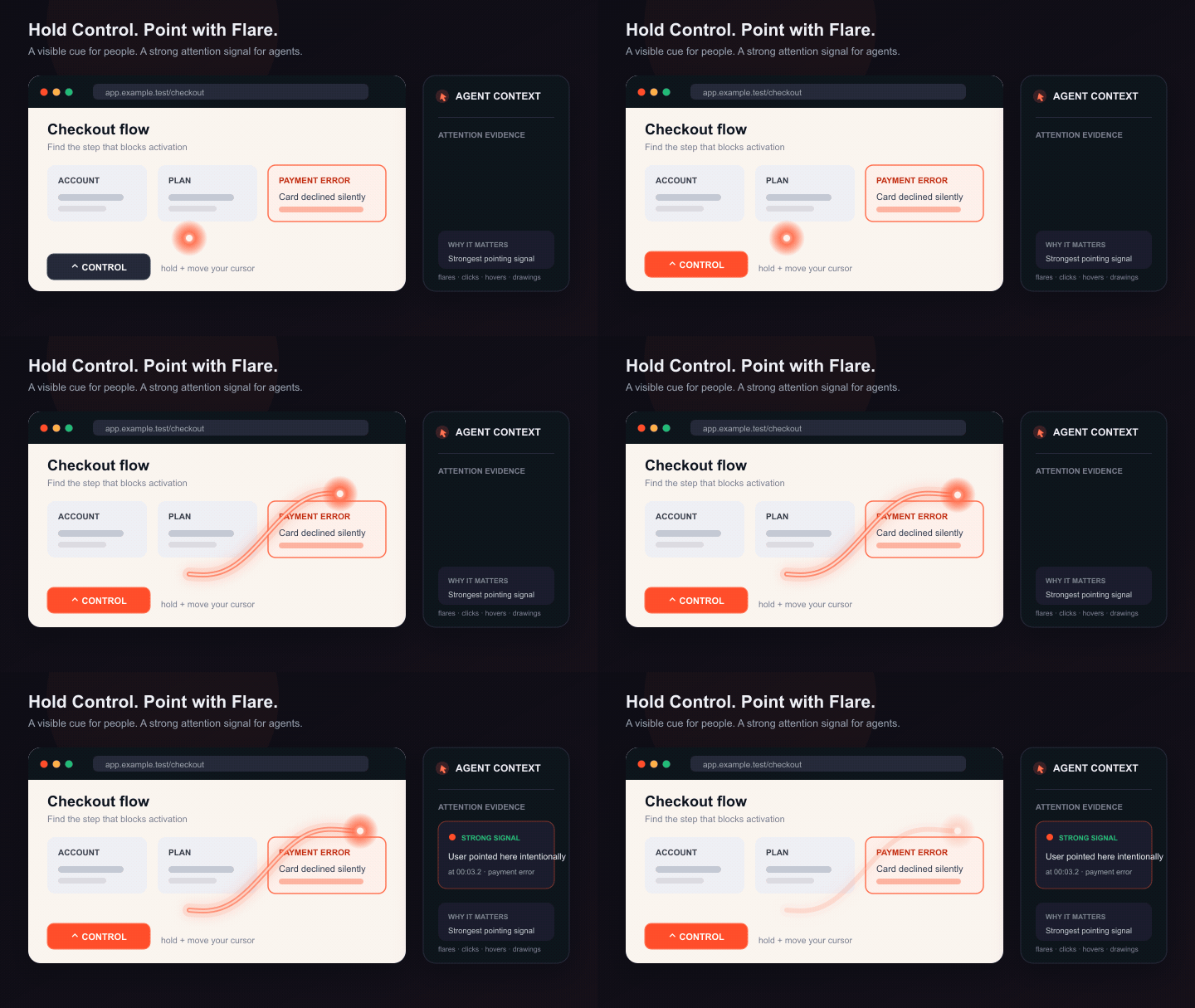
AUGUST 13, 2026 · FLARE
How do you point something out while recording?
Hold Control and move your cursor. Flare paints a warm, fading trail under it, so a viewer sees exactly where to look without waiting for an arrow to be placed. A quick Control shortcut such as Control+C does not trigger it; Flare waits for a deliberate bare-key hold.
What people see
The highlight is drawn live and captured in the recording. On Clipy for Mac, double-tap Control to keep Flare on while you point at several things, then double-tap again to turn it off.
What agents receive
Clipy preserves Flare timing alongside clicks, hover dwell, and live drawings. Its key-moment planner treats Flare as an intentional pointing signal when choosing frames and explaining what mattered.
Where is Flare available?
Use it while recording with the Clipy Chrome extension or Clipy for Mac. In the extension, Shift summons the freehand pen during a tab recording; Control is reserved for Flare, and the trail is drawn on the page itself, so screen and window captures pick it up whenever the browser is in frame. On Mac, full-screen, Area, and Window recordings capture the visible trail. Window mode uses the app window's fixed starting screen area, so Flare and the camera bubble stay in frame while anything entering that area can also be recorded.
Highlights
- Aug 16
Window recordings now keep Camera and Flare in the frame
Window mode now records the window's starting screen area, just like Cap: your camera bubble and Flare highlights stay visible in the video. Move or close the window and the crop stays put, so anything entering that area is captured. Hold Control to highlight, double-tap Control to lock Flare on, and press Escape to release it.
- Aug 13
Flare: point while you record, and your agent understands why
Hold Control and move your cursor to paint a fading orange trail over the thing you are explaining. The gesture appears in the recording for viewers and is preserved as explicit attention evidence, so Clipy's key-moment pipeline treats it as a stronger signal than ordinary cursor movement.
- Aug 12
Screenshots: capture, annotate, and share with a link
Screenshots are now a first-class Clipy type. Capture the visible tab or a full scrolling page from the Chrome extension, or paste any image into the new web library with ⌘V. A full annotation editor — arrows, boxes, text, numbered steps, pixelated redaction, crop — keeps the original image and leaves every annotation editable after sharing. Each screenshot gets an unlisted link viewers can open without an account.
- Aug 12
Workspace seats: recorders pay, viewers never do
The 10-member workspace cap is gone. Watching, searching, and reading a shared library are free for everyone; a seat is only needed to record beyond the personal free quota, and it costs exactly what individual Pro costs. Owners can set a hard seat ceiling or turn automatic seats off entirely.
- Aug 11
Bug-report evidence travels with the link
Bug-report recordings can carry browser console and network evidence captured by the Chrome extension (opt-in, with configurable sensitive-field redaction), and that evidence now shows to anyone the link is shared with — so the engineer debugging gets the same picture as the person reporting.
- Aug 10
Workspace and organization controls in the app
Teams can now create and manage organizations, switch workspaces, and collaborate from scoped contexts from the library and video controls.
- Aug 10
Extension reliability and startup refinements
Chrome recording reliability improved with better startup timing and safer completion paths so empty recordings are rejected before upload and users are shown explicit recovery guidance.
- Aug 10
Mac recorder stability improvements across device changes
Mac capture and upload handling now recovers more cleanly through device changes, network transitions, and recorder shutdown paths, reducing hard-stop failures on long sessions.
- Aug 8
A more dependable Clipy for Mac
Clipy now ships for Intel Macs as well as Apple Silicon. The recorder also gained a calmer menu-bar flow, a less intrusive recording dock, safer microphone capture, and clearer update feedback when a release is not available.
- Aug 7
Migrate from Loom without losing the useful context
Imported Loom recordings keep their transcript, summary, searchability, and agent-readable context. CSV imports begin automatically, and the Chrome extension can start a Loom download or YouTube import from where you are already working.
- Aug 7
Long recordings upload more reliably
We tightened chunk handling at the network edge, bound recording memory, preserved the fast path for wide 1080p captures, and improved desktop recovery and post-upload cleanup. The result is a sturdier route from Stop to a playable link.
- Aug 5
Share links now carry more of the video with them
Slack and social sharing received richer video unfurls, while Clipy proof recordings retain sharper screenshots and can preview directly in GitHub pull requests.
- Aug 7
New free accounts get 15 recordings or 2 hours
A one-time allowance, no expiry, no card. Deleting recordings does not restore it, so we say that up front rather than let you find out. Free accounts older than 7 Aug stay uncapped. Nothing you have already recorded is ever locked, watermarked or removed, and no single recording is ever cut short.
- Aug 7
Refund policy, pricing history, and a pricing page that tells the truth
14-day no-questions refund on any Pro charge. A dated record of every pricing change we have made, including the free-to-paid move we shipped without announcing. And the Pro card no longer sells AI summaries, transcripts, Q&A or analytics as paid — none of them was ever gated.
- Aug 7
Security contact and disclosure policy
[email protected], an RFC 9116 record at /.well-known/security.txt, stated response times, and a plain account of what we do and do not certify.
- Jun 15
Private and restricted sharing: invites, domains, request-access
Every video can now be Public (default), Restricted (specific people up to 10, or anyone on @your-domain), or Private. Locked-out viewers can request access; the owner approves with one click.
- May 24
Share links unfurl everywhere
Per-video OG image at 1200×630 so LinkedIn, X, Slack, Discord and iMessage all show a real video card with thumbnail, title and duration.
- May 24
Webcam overlay shows the camera again
Fixed a regression where the floating webcam bubble appeared empty during browser recordings. Now you can also drag it, resize it, and pop it out.
- May 20
The Clipy Pledge
Five promises Loom can't sign. Founder-signed, dated.
- May
AI summary on every recording, free
Including chat with your video → jumps the player to the exact timestamp. Loom paywalls this.
August 2026
- Aug 16Clipy for Mac Window mode now uses a fixed starting screen area with Camera and Flare included; the picker explains the crop and the recording controls teach Control-to-highlight, double-tap-to-lock, and Escape-to-release →
- Aug 13Flare is now easier to discover: a bottom-right in-product feature announcement shows the gesture in motion and links to a permanent explanation of how the Control-key highlight becomes attention evidence for AI agents →
- Aug 12Screenshot annotation editor on the web: arrow, box, circle, line, pen, highlighter, text, auto-numbered steps, pixelated redaction and crop — eight colours, three stroke weights, undo/redo, single-key shortcuts. Non-destructive: the original is kept and annotations stay editable after sharing →
- Aug 12Workspace seat billing: membership is unbounded and viewing is free; a seat is consumed when a member first records, at the same price as individual Pro. Owners get a hard seat ceiling, an auto-seat toggle, and an email on every automatic seat purchase. Members who already pay for Pro never consume a seat →
- Aug 12Watch page: 'Copy for agents' now copies a paste-ready prompt (including CLI install/update, the biggest source of agent-side breakage), the alternate agent links moved into a menu, and a new 'See how an agent reads this' link opens the recording's agent-readable .md twin
- Aug 12Chrome extension: the Loom button became a menu — Add to workspace or Download MP4 — with server-side import so tool-page and extension imports converge on one document; plus library multi-select and a rebuilt /download/extension page →
- Aug 12Fixes: CLI login URL no longer truncated by cmd.exe on Windows; editor Text tool works again; Loom imports give clearer feedback; floating-element overlap resolved; admin timestamps shown in the viewer's timezone; iOS downloads of generated tool files are reliable
- Aug 11Bug-report browser evidence (console + network) is visible to everyone with the link, with the same access model as the recording itself; YouTube caption import restored; anonymous converter limit raised to 6/hr with actionable rate-limit messages; recording-ready and analytics latency reduced
- Aug 10Chrome extension captures browser bug diagnostics for bug-report recordings (opt-in), with configurable sensitive-field redaction for tab recordings; regional Pro Annual discount now shown as a gift voucher at checkout
- Aug 9Screenshot sharing shipped: web library at /screenshots with ⌘V paste, drag-drop and upload; unlisted share links at clipy.online/s/…; extension captures upload straight to the library →
- Aug 9Live support chat on the site: real-time, context-aware, and staffed — replacing the contact-form-only flow
- Aug 10Chrome extension reliability patch: popup startup is faster, empty recording finalization is blocked, and recovery errors now explain whether a local copy exists. →
- Aug 10Chrome extension uploads from unpacked builds remain supported with CORS allowlist updates that keep credentials requests safe while reducing local setup friction.
- Aug 10Mac recorder stability: audio device handling, upload-finalize timing, and camera startup now tolerate real-world device/network changes without hard failures.
- Aug 10Organizations and workspaces shipped in-app: create, invite, and switch workspaces so teams can manage recording ownership and history together. →
- Aug 8Clipy for Mac: Intel builds join Apple Silicon support; the menu-bar recorder has a more focused stop dock, disables the camera for window-only captures, and gives a clear response when no newer update exists →
- Aug 7Recording reliability: echo-safe microphone capture, bounded client memory, hardened chunk uploads, wide-1080p fast-path preservation, faster post-stop upload handoff, and desktop recording recovery and cleanup
- Aug 7Loom migration: imported recordings retain their transcript and generated summary; CSV imports start automatically; the Chrome extension adds direct Loom-download and YouTube-import actions →
- Aug 7Admin operations: hour-aware recording data, unique-viewer detail, dated Pro access windows, regional Annual pricing, and owner-assigned upgrade offers
- Aug 5Sharing and proof: richer Slack and social video unfurls, sharper screenshot-based proof recordings, and autoplaying proof previews in GitHub pull requests
- Aug 7Free plan allowance: accounts created from 7 Aug get 15 recordings or 2 hours of recording, whichever comes first. One-time, no expiry, no card; deleting recordings does not restore it. Older free accounts are grandfathered and stay uncapped. Recordings already made stay playable and downloadable permanently, and no plan caps how long a single recording runs →
- Aug 7The Clipy Pledge amended, not reworded: promise 3 said the free experience would stay free for existing and new users. The second half no longer holds, so a dated retraction sits beneath the original wording rather than replacing it →
- Aug 7Pricing history: a dated record of every pricing change, including the free-to-paid move in mid-2026 that we shipped without a changelog entry or an announcement →
- Aug 714-day no-questions-asked refund on any Clipy Pro charge, monthly or annual →
- Aug 7Pricing page corrected: AI titles, summaries, transcripts, ask-the-video Q&A, viewer analytics, embeds and knowledge-base search were listed as Pro unlocks. None is gated; all are free on every plan. The card now lists only the three things a real gate refuses →
- Aug 7Security: [email protected], a disclosure policy with stated response times, and an RFC 9116 record at /.well-known/security.txt →
- Aug 7Terms: named jurisdiction (Delaware), a stated liability cap, an explicit retention policy — recordings are never auto-deleted and stay playable if you downgrade to free →
- Aug 7Free trial retired. The free plan is the trial, and it does not expire; Pro charges on day one and is refundable for 14 days
- Aug 7Lifetime plan retired from sale. Everyone who bought one keeps it, unchanged
- Aug 7Admin: recording length, source platform and location on the recent-videos view
- Aug 7Desktop: separate beta and beta-silicon release flows →
July 2026
- Key moments now anchor to what you actually pointed at: Flare highlights, clicks, draw annotations and hover dwell, with the frame captured at the end of the gesture rather than mid-sweep
- Bug-report recordings get up to 100 key moments instead of 30, because a missed repro step costs a debugging cycle
- clipy proof: turn screenshots or an existing WebM/MP4 from any agent tool into a shareable recording with timestamped narration, no extra browser dependency →
- @clipy/cli and @clipy/mcp 0.11.0, published in lockstep; MCP registry listing at online.clipy/mcp →
- Share thumbnails are yours to choose: upload one, pick a frame, or turn it off — and social crawlers finally see it instead of a generic brand image
- ⌘K searches inside your recordings, not just their titles, and jumps to the moment a phrase was spoken
- App shell for the signed-in product: real sidebar navigation, search in the top bar, filters out of the left rail
June 2026
- Per-video sharing tiers: Public (default) / Restricted (10 invites or whole email domains) / Private. Locked-out viewers can request access; owners approve from the share panel. →
- Admin analytics: daily and weekly unique-creator counts alongside the videos-created chart
- Chrome extension v2.1.5: repositioned as a free Loom alternative + Loom migration helper: switch from Loom, download your Loom videos (single or batch via clipy.online), and re-host them free on clipy.online →
- Chrome extension v2.1.4: decluttered post-recording flow ('Record another' fully resets, top-3 share options + 'More ways to share', recents/diagnostics tucked into Advanced), cursor effects restored in tab recordings, and a thinner popup scrollbar →
- Chrome extension v2.1.3: full-page (scroll & stitch) screenshots →
- Chrome extension v2.1.2: local recovery, always-visible recording controls, restart, auto-zoom, richer annotations, output controls, 5-star prompt, compacted popup, and optional crash reporting →
- Chrome extension v2.0.2: popup dropdowns now legible on Windows; share grid trimmed to four buttons
May 2026
- Twitter / X / LinkedIn cards: full og:image and twitter:card set, per-video 1200×630 preview
- Webcam overlay: srcObject bug fixed; overlay is now draggable, resizable, with hover controls
- Chrome extension v2.0.2: recording state machine fix, webcam-bubble UX overhaul →
- Trust & Data: field-level disclosure of what we store →
- Status page →
- What recipients see: viewer-experience walkthrough →
- Recording quality: real samples and encoder details →
- Branded transactional emails (logo + AI features mentioned)
- Footer: social links (X · LinkedIn · Facebook · YouTube) + reciprocal listing badges
- Mac M5 support copy + a Codersera-backing line in the footer
- Under the hood: better retry resilience on transient B2 outages
- Under the hood: ffmpeg stderr now lands in logs, so failure post-mortems take seconds, not hours
- View counting actually increments now (it was an accidental no-op)
April 2026
Earlier
- Built Clipy. Free forever, no watermark, no sign-up to watch. Mac app + Chrome extension + web recorder.
Want something? Email support@clipy.online or use the feedback form.